

If you added Meal Choices and/or Dietary Restrictions to your registration form, you can easily create a report with this information.
To create a report of your meal choices:
Go to Search/Reports in the dark blue menu bar
Click Add/Remove columns
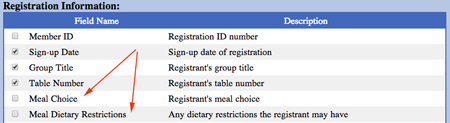
Scroll to the Registration Information section
Check the checkboxes next to Meal Choices and/or Dietary Restrictions (if these were included on your Registration Form)
Scroll to the bottom of the page and click continue
The report that is created will show each registrant and their meal choice.

*TIP: use Excel's COUNT feature to have it count the quantity for you.
Other articles you might enjoy:
Updated 7/13/16